Xevraniq
Anchor Module
Anchor Module
Couldn't load pickup availability
1. Problem Statement
Cybersecurity routines often become inconsistent when people rely on memory or react only after something unusual happens. Account reviews, file checks, permission updates, and communication procedures may be completed irregularly or without written guidance. When responsibilities are unclear, several people may assume that someone else has already reviewed an issue. Small concerns can remain unnoticed because there is no stable process for documenting and addressing them. This creates a need for organized routines that connect daily actions with broader cybersecurity awareness.
2. Solution
Anchor Module presents a structured approach to building dependable cybersecurity routines. Learners examine how recurring reviews, assigned roles, written procedures, and careful documentation can support better digital habits. Each section connects practical actions with realistic situations involving accounts, files, communication, and shared responsibilities. Guided exercises help learners create checklists, review schedules, and response notes suited to personal or team settings. The course is designed to help learners replace scattered actions with a steady and thoughtful process.
3. What’s Inside
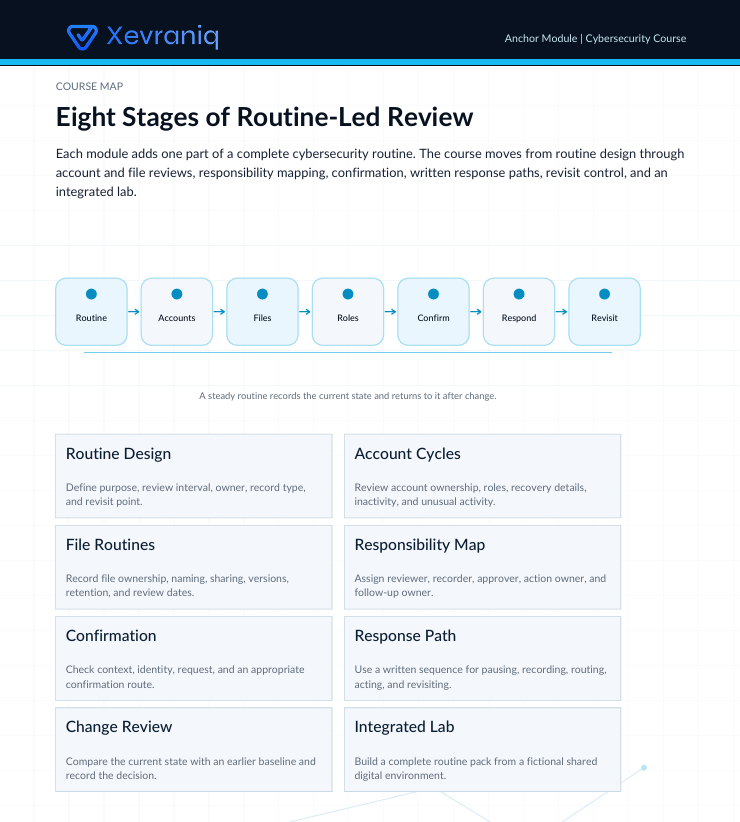
The opening section introduces the anchor method: Review, Record, Confirm, Respond, and Revisit. Learners study how each stage contributes to a consistent cybersecurity routine. A guided worksheet helps turn broad concerns into specific actions that can be reviewed over time.
The account-routine section covers password review habits, recovery details, unusual activity notices, inactive accounts, and role changes. Learners create a personal or team account checklist and decide how often each item should be reviewed. The section also explains how to record completed checks without storing sensitive details in an unsafe format.
The file-handling section focuses on naming practices, ownership, duplicate copies, outdated materials, and sharing decisions. Learners examine how unclear file organization can create confusion during routine work or an incident review. Activities include building a file-review checklist and identifying materials that require additional care.
The responsibility section explores how tasks can be assigned in shared environments. Topics include unclear ownership, overlapping duties, delayed reporting, and missing follow-up steps. Learners prepare a simple responsibility map showing who reviews, records, confirms, and responds to selected situations.
A response-planning section introduces written procedures for suspicious messages, unexpected account changes, misplaced files, and unclear requests for information. Each procedure is broken into calm, practical steps. Learners compare several response paths and note which details should be confirmed before further action is taken.
The final section brings these topics together through detailed scenarios. Learners review a digital environment, identify missing routines, assign responsibilities, and prepare an improvement plan. Supporting materials include checklists, responsibility maps, review schedules, terminology notes, scenario worksheets, and reflection prompts.
4. Who Is This For?
Anchor Module is intended for learners who want to create steady cybersecurity routines for personal study, independent work, or shared environments. It may suit students, coordinators, administrators, remote teams, and people who regularly handle digital information. No technical background is required, though knowledge of basic cybersecurity concepts may be useful.
5. What You’ll Learn
- Build recurring cybersecurity review routines
- Create practical account and file checklists
- Assign clear responsibilities in shared environments
- Record completed reviews without exposing sensitive details
- Prepare written response procedures for common concerns
- Identify gaps in existing routines
- Organize follow-up actions after an unusual event
- Connect daily habits with wider cybersecurity awareness
- Review outdated accounts, files, and permissions
- Prepare a structured improvement plan
- Revisit procedures as routines and responsibilities change
6. 30-Day Refund Policy
Refund requests for Anchor Module may be submitted within 30 days of purchase. Each request is reviewed under the terms shown on the Xevraniq store policy page during checkout. Learners should read those terms before placing an order, including any conditions related to completed modules, downloaded materials, or course usage.
Self-paced learning overview
- 📥 Digital file available after purchase
- ♾️ Long-term availability
- 🔒 Secure checkout
- 🗓️ Content updated in 2026
How are the courses organized?
How are the courses organized?
Each Xevraniq course is divided into clear modules with focused topics, guided explanations, practice tasks, and review prompts. The structure allows learners to follow the materials in order or revisit selected topics when needed.
Can I study at my own pace?
Can I study at my own pace?
Yes. The materials are designed for self-paced study, so learners can choose a rhythm that fits their schedule. Progress depends on personal study habits, time spent with the materials, and regular practice.
What kind of support is included?
What kind of support is included?
Learners can send course-related questions through the contact form. Replies focus on course structure, topic clarification, and guidance on where to find relevant materials.
Share